
For the last few years, I wore either an analog watch or a Xiaomi Band for basic step tracking and telling time. I never chose an Apple Watch because I wasn’t constantly active, I didn’t feel the need to check notifications on my wrist, and I didn’t want the burden of daily charging.
This year, I had the chance to test the new Google Pixel Watch 4, and it made me reconsider wearing a smartwatch regularly. I’ve always preferred circular watch designs. One of my first smartwatches was the Moto 360, which I loved for its rounded look.
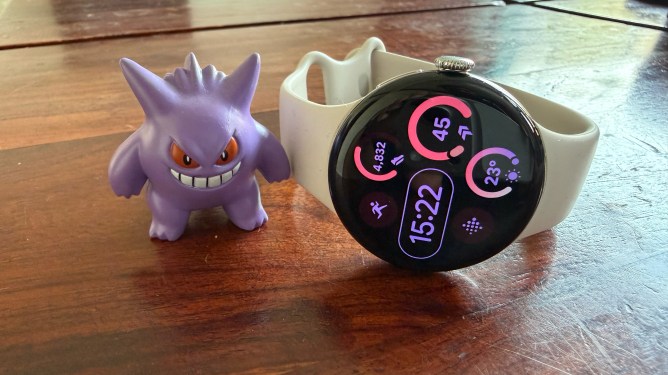
The Pixel Watch 4 features a curved domed Actua 360 display with thinner bezels compared to last year’s model. My test unit is the 41 mm size, but I would personally choose the 45mm for its larger display and better battery capacity. The screen is also significantly brighter, with 3,000 nits of peak brightness, making it much easier to see in daylight.
Battery life on the Pixel Watch 4 is impressive, even with the smaller size. On days with lighter activity, I consistently got more than a full day of use. The watch uses a proprietary charger where it sits on a puck-like cradle, but the charging speed makes this limitation easy to overlook.
Google advertises a charge from zero to fifty percent in fifteen minutes, and a full charge in forty-five minutes. While real-world times don’t exactly match these figures, they come very close. The benefit of this rapid charging is that you can top up the battery while making coffee or doing a quick chore, gaining enough power to last the entire day.
I primarily used the Pixel Watch 4 to track my pickleball sessions and walks. Beyond calorie burn, it didn’t provide deep insights into sports movements. Recently, I started going to the gym, and apart from treadmill and elliptical modes, there are no specialized modes for specific gym equipment. You must select from general options like core training, weights, or a standard workout mode.
The watch has more features for runners, but running isn’t feasible in Delhi’s current weather with its terrible air quality. It can automatically detect cardio workouts after fifteen minutes of continuous activity, but these detections were hit or miss during my walks. Another inconsistent measure for me was the floor count. Some days when I walked to a cafe, it showed a very high count, while on days I made multiple trips to my terrace, the number of floors climbed was incorrect.
I never used to wear a watch to sleep. With the Pixel Watch 4, I had to train myself to keep it on to understand my sleep and readiness scores. After a few weeks, I wore it regularly at night. However, the daily summary on the watch doesn’t provide additional or actionable insights about sleep or readiness. You get some readiness suggestions in the Fitbit app, but that’s it. As fitness apps integrate more AI, Google needs to enhance its offerings in this area.
Google’s new Material UI design for the watch is refreshing and matches the theme on my Pixel Fold. The weather app is visually appealing for both hourly and daily forecasts. My one complaint is that I wish the exercise app allowed quick access to more than three workout types. Raising my watch to talk to Gemini is neat, but beyond starting timers, asking for sports updates, and beginning a workout, I haven’t needed Gemini to be constantly available.
I’ve become a fan of the recent update that lets me use a pinch gesture to dismiss notifications, play or pause media, or even dismiss calls with a wrist movement.
The minor issues I encountered didn’t bother me in daily use. The display is fantastic, the software and overall fitness experience are great, and the new design is a clear upgrade from the previous generation. However, the combination of reliable battery life and incredibly fast charging is what drew me to the watch and made me stick with it.
All in all, the Pixel Watch 4 stands as one of the best Android smartwatches available.