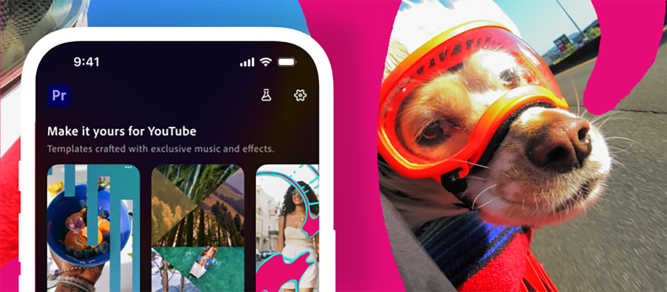
Adobe has partnered with YouTube to launch a dedicated content creation space within Premiere for iOS, designed specifically for YouTube Shorts creators. Announced on Monday, this new space provides creators with exclusive templates, transitions, and effects. It also includes the ability to publish Shorts directly to their YouTube channels from their phones.
The space is intended to give creators all the tools needed to produce viral videos, grow their audience, and tap into current trends. This applies whether they are making day-in-the-life vlogs, travel videos, or behind-the-scenes clips.
Through this partnership, YouTube is offering creators on its platform an exclusive area to develop content. This encourages them to use this partnered space over competing tools, such as Meta’s Edits or ByteDance’s CapCut.
A unique aspect of this partnership is how it integrates inspiration with creation. Creators browsing their YouTube Shorts feed can launch a template that catches their eye directly into Premiere mobile and begin customizing it for their own channel. This content creation space within the Premiere mobile app is specifically designed and optimized for YouTube Shorts.
The Create for YouTube Shorts space features templates from top creators that come with built-in text, effects, and transition presets. Creators can add their own media and customize these templates to match their style. There is also an option for creators to build and submit their own original templates.
To begin, creators need a free Premiere mobile login to access the space and a YouTube profile to publish directly to their Shorts feed. After downloading Adobe Premiere from the App Store, they can tap the “Create for YouTube” option to enter the creation space.
From there, creators can upload clips from their iPhone camera roll, cloud storage, or Adobe Creative Cloud. They can then cut and trim clips, layer video and audio tracks, adjust color and brightness, and add text overlays and captions. After following the export prompts, they can upload the finished product directly to YouTube.
New tools in the app, like templates, effects, transitions, and this dedicated space for Shorts, are designed to be powerful for everyone from seasoned creators to beginners. It brings polished video editing with studio-quality audio, AI sound effects, precision multi-track editing, and Firefly AI content generation to make producing and sharing content easier and faster. The ultimate goal is to empower creativity for all by making this the best time ever to be a creator.